The local-first workspacewhere docs, tasks and code stay connected.
Your project’s brain. On your disk.A local-first workspace for people who design and build software, games and complex technical projects - documentation, canvas, planning and code context in one connected project, in plain files you already own. AI is a switch you flip - never a foundation you depend on.

Five tools become one brain.
The context between them lives nowhere: tasks in one app, docs in another, diagrams in a third, code in a fourth - and your AI sees none of it.
- ClickUp / JiraTasks, deadlines, status
- Notion / ObsidianDocumentation and knowledge
- Miro / FigJamDiagrams and visual design
- IDE / GitHubImplementation and source
- Claude / CursorThe AI's separate context
 OmniFolderONE CONNECTED PROJECT
ON YOUR DISK
Coming from one of these? See the honest comparisons →
In OmniFolder the documentation knows about the tasks, a task knows the exact sentence it came from, design links to the code that implements it - and an agent reads the same approved context you do. One window, and it works with the network cable unplugged.
Go deeper, page by page
 /// PRODUCT
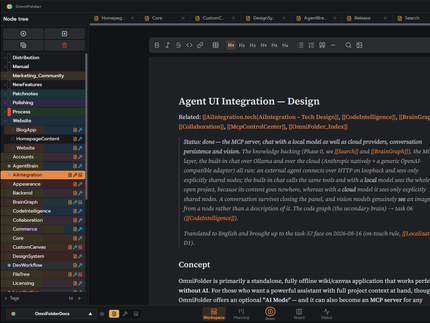
Six tools, one window
Markdown docs, infinite canvas, kanban, knowledge graph, code intelligence and an AI panel - one local-first app over plain files you own.
Explore the product →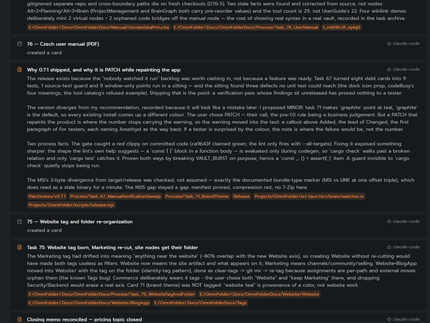 /// AI & AGENTS
Off by default, yours when it’s on
A local MCP server gives AI agents your project’s real context - node by node, approved by you. Local models or your own key.
See the AI layer →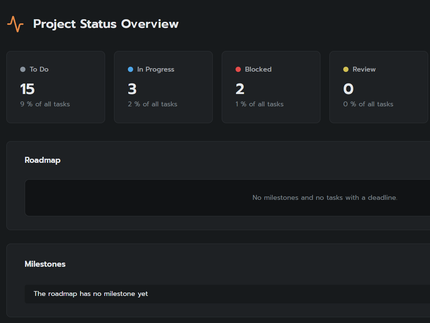 /// PRIVACY
Private by architecture
No telemetry, no account, no cloud copy - plain files on your disk and a beacon on every egress. Privacy you can verify, not a policy to trust.
Read the vows → /// PRICING
Free for personal use, forever
Commercial use is a one-time purchase - a year of updates included, renewal optional. Never a subscription.
See the licences →Frequently asked questions
What is OmniFolder?
OmniFolder is a local-first desktop workspace for people who design and build software, games and complex technical projects - documentation, visual canvases, tasks, roadmap and code relationships in one connected project, with AI as an optional layer. Your project stays in plain files on your disk.
Is it a Notion, Obsidian or ClickUp replacement?
It replaces the scatter: the docs, tasks, canvases and code context that today live in four separate tools become one connected local project. It is plain markdown underneath, so notes move in and out freely.
Do I have to use AI?
No. AI is off by default and the whole app works without it - offline, with no account. Turning it on is one switch per provider, and a beacon shows the moment any data leaves your machine.
Where does my data live?
In plain files - markdown and JSON - in a folder on your disk. There is no cloud copy and no telemetry. Nothing transmits unless you switch a cloud AI provider on, and when it does, you see it.
Is OmniFolder Windows only?
Windows today. macOS and Linux versions are planned - OmniFolder is built on Tauri, which runs on all three - but Windows is where we polish first.
What does it cost?
Personal and evaluation use is free, forever - not a trial, no account. Commercial use takes a licence (Indie or Pro): buy once, own it for life, with a year of updates and support included and renewal optional - never a subscription. Prices land at launch.
Thoughts that fired recently
Your project's brain, on your disk - why OmniFolder exists
OmniFolder is a local-first workspace where notes, a knowledge graph, a canvas, task planning and AI agents all work over one folder of plain markdown. Why we built one mind instead of six apps.
FOLLOW THE SYNAPSE →How to run an MCP server over your notes
MCP lets AI agents like Claude Code read your notes - with your permission, node by node. How OmniFolder's built-in MCP server works, how to connect a client, and why it binds to 127.0.0.1.
FOLLOW THE SYNAPSE →What is local-first software?
Local-first software keeps your data in files on your own machine and treats the network as optional. Here is a working definition, the test that separates local-first from mere offline mode, and why it matters for your notes.
FOLLOW THE SYNAPSE →Every tool is a region of one mind
The metaphor we build by: not six apps taped together, but six functions of one connected tissue, reading and writing the same nodes.
- HippocampusMemory - the editor
- Association cortexConnections - the graph
- Visual cortexImagination - the canvas
- Executive functionIntention - the planning
- Language centerSpeech - the assistant
- Motor neuronsReach - the agents
Your second brain should live in your skull - not in someone else's cloud.
Your project deserves
a mind of its own
OmniFolder · Windows · free for personal use · no account required